You can add a serch engine that you use on your favorite site by choosing "New" into Quick Tool's menu .
Once the dialog box is open, copy the exact adress of the web site into the text field containing the text http://www.
Some page have more then one search form. In this case Orbiscope will ask you to choose one by opening a new dialog box.
Choose the one that seems to have the search terms.
Your new quik tool will be added into the Quick Tool panel
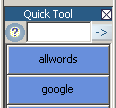
, and into the Category properties
Now that your tool is added, there are plenty of ways to use it:
- Into the panel Quick Tool
- When making an advanced search By choosing the check box: Page internal search